
Squid Battle Simulator

Squid Battle Simulator

Watch an ad to play this game.

Squid Battle Simulator

Squid Battle Simulator Unblocked

Rate it
Players Single player
Devices Desktop
Controls WASD, Mouse
Added Jan 2021

How to Play Squid Battle Simulator

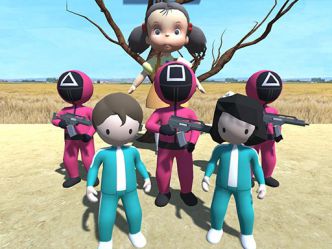
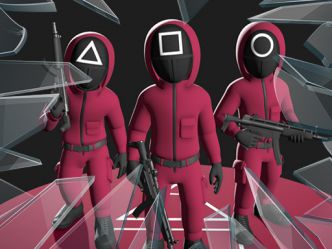
Command a massive Squid army. Take charge of your soldiers and players. Send the boss, the front man, and the employees into combat with coffins. Keep an eye on how your shooters are engaging the enemy. Control a doll that keeps an eye on the enemy and kills them if they move. All adversaries must be crushed. Demonstrate your tactical abilities. Demonstrate that you are the world's finest general! Key Features: - large-scale and spectacular battles - unique and funny units - ragdoll physics of computing - beautiful graphics

Squid Battle Simulator Controls

  • WASD
  • Mouse

WASD + Right mouse button (hold down) - standard movement WASD - alternate movement Shift - speed up the movement Q / E - rotate the camera Left mouse button - create a unit Right Mouse Button + CTRL - delete Unit

Is Squid Battle Simulator Unblocked at School?

Yes. Squid Battle Simulator runs entirely inside your browser tab as an HTML5 game, so there is nothing to download, install or unzip and no plugin such as Flash or Java is required. That matters on a school or office network, because the filters used on those networks usually block installers and app stores rather than ordinary web pages. It is built for a desktop or laptop browser, so a school Chromebook or library PC is the right device for it rather than a phone. If the page loads for you, the game will run.

Squid Battle Simulator FAQ

Is Squid Battle Simulator free to play?

Yes. Squid Battle Simulator is completely free on Masked Games. There is no account to create, no trial period and no payment step — open the page, press play and the game starts.

Do I need to download anything to play Squid Battle Simulator?

No. Squid Battle Simulator is an HTML5 browser game, which means it loads and runs on this page itself. Nothing is installed on your computer and nothing is left behind when you close the tab.

Can I play Squid Battle Simulator on a phone or tablet?

Squid Battle Simulator is designed for a desktop or laptop browser and expects a keyboard or mouse, so it is best played on a computer rather than a phone.

What are the controls for Squid Battle Simulator?

Squid Battle Simulator is played with wasd, mouse. WASD + Right mouse button (hold down) - standard movement WASD - alternate movement Shift - speed up the movement Q / E - rotate the camera Left mouse button - create a unit Right Mouse Button + CTRL - delete Unit

Is Squid Battle Simulator a two player game?

Squid Battle Simulator is a single player game. If you are looking for something to play with a friend on one keyboard, browse the two player games collection.

Games Like Squid Battle Simulator

If you enjoyed Squid Battle Simulator, these unblocked games are the closest matches in 3d games: Squid Game Escape Plan, Redcoats.io, Angry Birds 2, Escape the Alien Prison, Squid Sniper Shooter Games, Red Light Green Light.io. You can browse the full 3d, action, adventure, puzzle, squid game, strategy, war collections for more.